
On this page
The Odds search Odds Search is MB-Tracker's odds matcher, built straight into the calculator. Set up your bet as usual, press search, and it lists the best pairs of odds at your bookmakers, ranked by what each pair is worth with your exact settings: stake, Freebet, Refund, rollover, tax or commission and any active Campaign calculator campaign calculator. Click a result and the calculator is filled in, ready to place.
New to all this? The beginner's guide to matched betting explains the basics, and the best matched betting setup shows where the search fits in.
How to run an odds search#
- Open the calculator and pick Bookmaker 1, where your offer is.
- Enter your stake and set up the bet as you normally would: Freebet, Refund, rollover, a campaign, whatever the offer needs.
- Leave Bookmaker 2 empty to search all your bookmakers, or pick one to search only that one.
- Press the green magnifying glass Odds search next to Odds 1, then Search.
- Click a result to fill in the calculator.
The search supports both Back-Back Back-Back and Back-Lay Back-Lay. Which one you get just depends on your selected bookmakers: a betting exchange as the counter bookmaker gives Back-Lay, any other bookmaker gives Back-Back.
If the magnifying glass is greyed out, hover over it and it tells you what is missing, such as a stake. The graduation cap at the top of the search window starts a guided tour of every control.
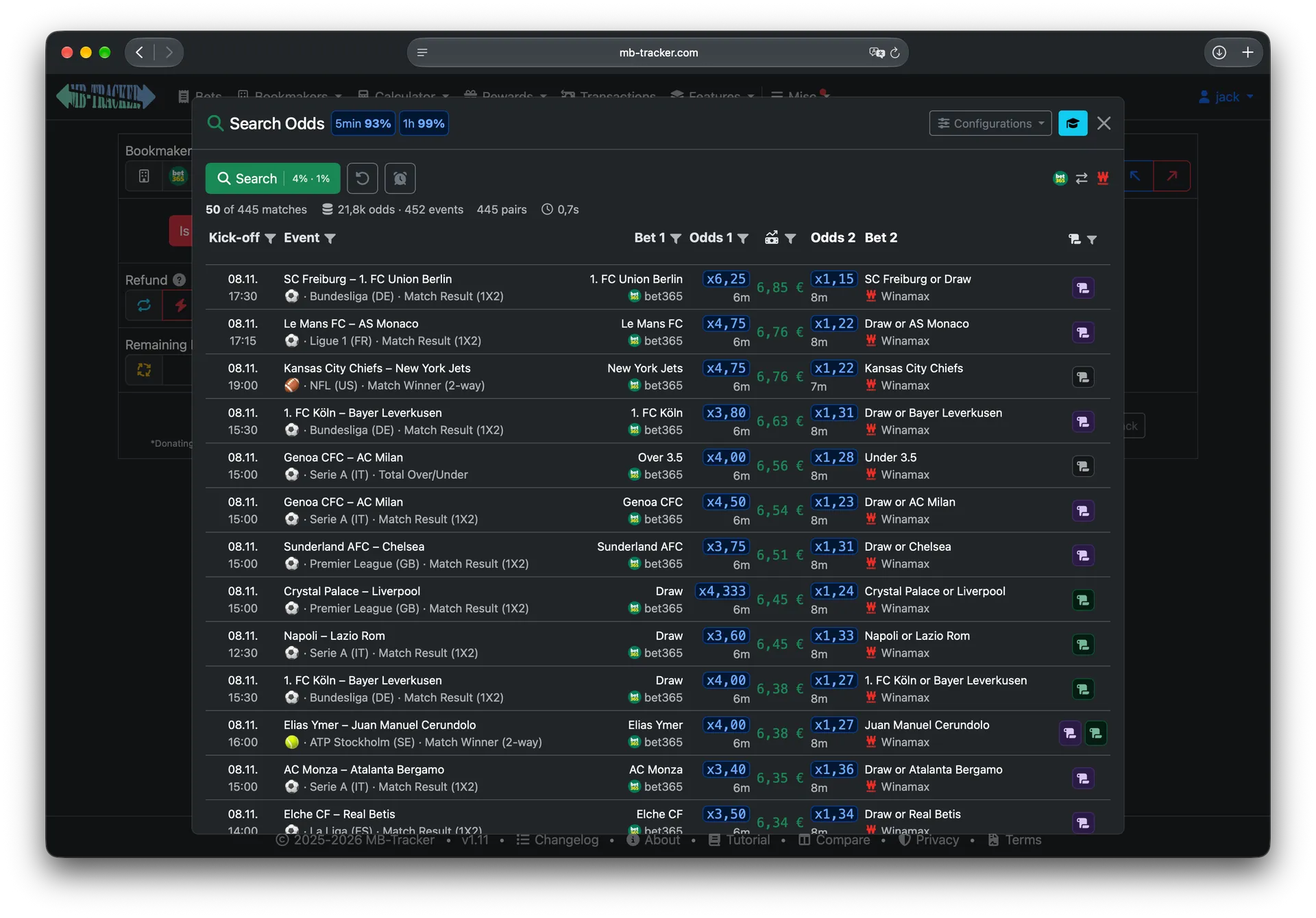
Every calculator setting goes into the search#
The best pair of odds depends on the bet you are placing. So the search takes all of it from the calculator:
- Stake, and whether the bet is a Freebet
- Bonus money
- Refund, paid as cash or as a Freebet
- Bonus on win Bonus on win, paid as cash or as a Freebet
- Rollover Remaining Rollover, Future Rating and the Advanced Rollover switch
- Underlay and Overlay, if you want to favour one outcome
- The active campaign calculator, with its own settings

It also applies what you have saved per bookmaker, such as tax or commission and Freebet ratings. Here is how much that changes the result. These are the same three pairs of odds, with a stake of €10 and no tax or commission, priced with five different setups:
| Calculator settings | x6.25 / x1.15 |
x4.00 / x1.27 |
x1.70 / x2.35 |
|---|---|---|---|
| Freebet | +€6.85 | +€6.38 | +€4.02 |
| Cash bet | −€1.85 | −€1.50 | −€0.23 |
| Cash bet, €10 Refund as a Freebet rated 70% | +€4.24 | +€4.02 | +€2.74 |
| Cash bet, €50 Remaining Rollover at 95% Future Rating | −€2.11 | −€1.92 | −€1.38 |
| Cash bet, 30% boost campaign capped at €5 | −€1.20 | −€0.43 | +€2.64 |
The pair that is best for a Freebet is the worst one for a cash bet, and the boost campaign turns the lowest odds into the only profitable choice. A single sorted list of odds can't show you that, which is why the search prices every pair with your settings before ranking it.
Your bookmaker settings count in the same way. That x1.70 / x2.35 cash bet costs €0.23 with no tax or commission and €0.44 with 5% tax or commission on winnings at Bookmaker 1.
Change a setting after a search and the results hide behind a warning, because they were priced with the old values. Search again, or choose Show anyway to compare.
Campaign calculators work with it too#
Every Campaign calculator campaign calculator works with the search, and this is where it saves the most effort. A campaign's value usually changes with the odds, so you can't work out the best bet from one calculation. The search does it for every pair.
Switch the campaign on in the calculator and open the search. Each result is then priced with the promotion at that result's own odds, using the same maths as the campaign calculator:
- Boost Percentage boosts: the boost is worked out per result, with its minimum odds, stake limit, maximum boost, payout cap and tax rules applied. Your own boost percentage and maximum boost are used too. With Max Stake on, each result uses its own stake, the one that reaches the maximum boost.
- Refund Cashback by odds: the rate comes from the odds of each result, with minimum stake and maximum cashback applied, paid as cash or as a Freebet.
- Tiered payouts: each result is priced by the payout tier its odds reach, based on the tiers you actually hold.
- Special promotions: the rules of the campaign go into the search just as they go into the calculator.
The campaign also sets the filters. The sports, leagues and markets it is valid for are filled in and locked with a padlock as soon as you open the search, so you only see bets that qualify. Where a campaign allows it, you can still remove leagues or markets you don't want, and your choice is remembered for that campaign. If it has a required odds range, you can search anywhere inside it.
Fields the campaign controls, such as Bonus on win for a boost, are disabled in the calculator and don't affect the search. The fields you still control work as usual, so a boost campaign that can be combined with a Freebet is priced as both.
Click a result and the calculator shows the same figure, with the campaign still on.
Narrowing down the results#
The filters sit in the column headers of the results table, and each header shows a short summary of what is set:
- Kick-off: only events that start after or before a time you choose.
- Event: sports, leagues and fixtures. Select several, or remove individual ones.
- Bet 1: markets to include or exclude.
- Odds 1: an odds range, useful for minimum-odds rules, in any notation the calculator accepts:
2.5,+150,3/2or0.4. This is also where you set the maximum odds age, 40 minutes unless you change it. - Value column: a minimum rating or a minimum profit. Switching between the two converts the value.
- Payout rules: untick a verdict to hide those results.
Above the table, the logos show the bookmakers being searched. Click one to leave it out for now, and click it again to bring it back. A greyed-out logo has no odds available at the moment. To leave a bookmaker out for good, turn it off in the bookmaker settings; it is then only searched when you pick it as Bookmaker 2.
Once you have filters you like, save them under Configurations. Each one belongs to a Bookmaker 1, and the one you star is applied automatically when you pick that bookmaker.
Reading a result#
Each row shows one pair of bets: the kick-off, the event with its sport, league and market, then both bets with their bookmakers. Under each price is its age, so you can see how fresh it is.
The icon on the right is the payout rules verdict: whether both bookmakers settle that bet the same way. Payout rules compatible means they do, and Payout rules incompatible means they don't, so one bet could be voided while the other loses. Payout rules unknown means there are no rules for that combination yet. A verdict can also be Partial or Extra profit. Hover over the icon for details, or compare two bookmakers on the payout rules page.
Clicking a row fills in both bookmakers, both odds, both bets and the event, then works out the counter stake. The calculator also shows the age of the odds, the verdict and how each bookmaker spells the teams, which helps you find the bet. Always check that the odds on the bookmaker's site still match before you place anything. When both bets are placed, Track Bets logs them.
Try it on your next offer#
Take the next offer you were going to do anyway, set it up in the calculator and press search. If there is a promotion, switch its campaign on first.
Prices move and terms differ, so always check the odds and the offer's terms before you place a bet. Whether matched betting is allowed and how it is taxed depends on your country. You must be 18 or older. Only use money you can afford to lose, and take a break if betting stops feeling under your control.